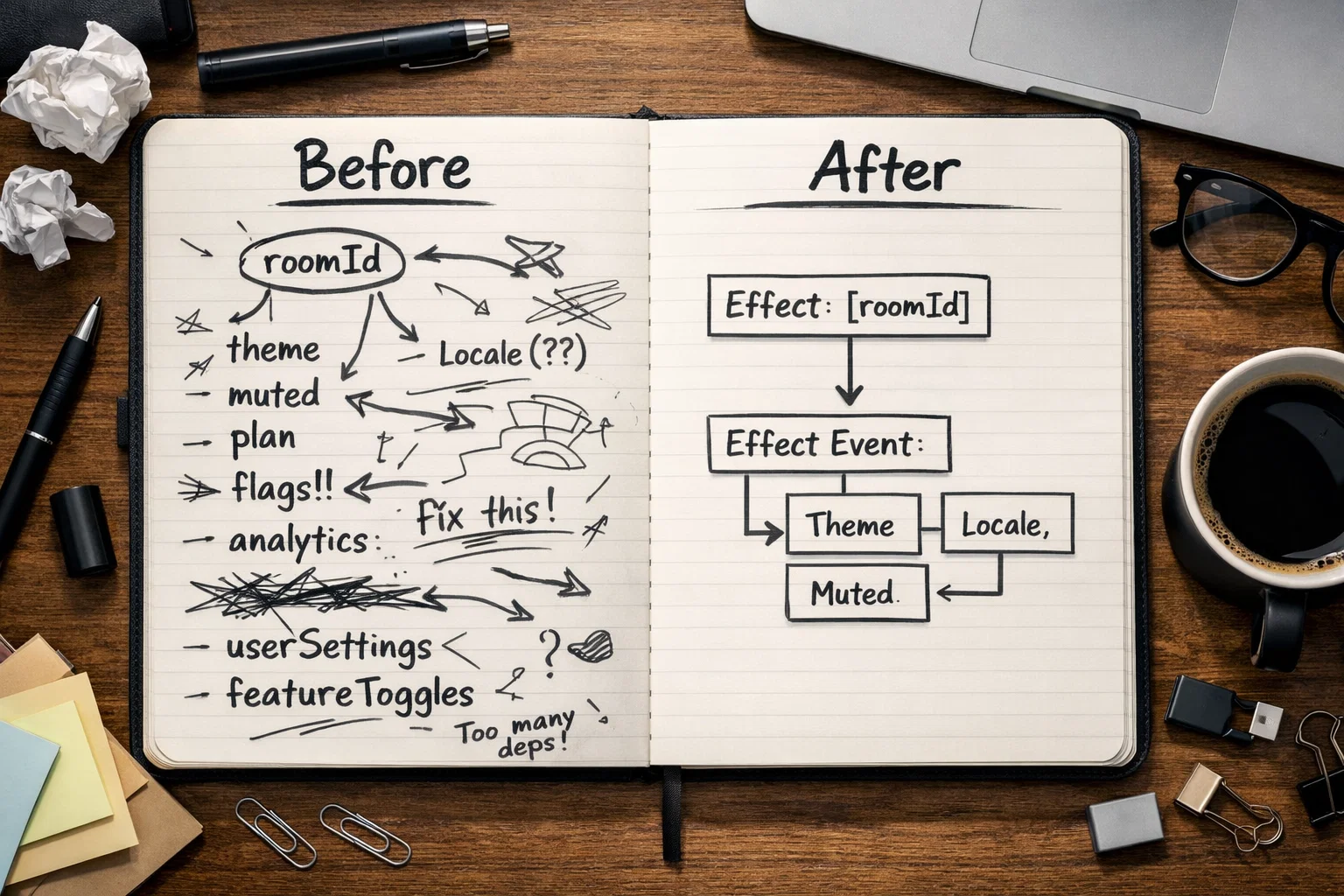
React useEffectEvent Deep Dive: stale closures, subscriptions, listeners, timers, and analytics in React 19.2
A practical React useEffectEvent deep dive for React 19.2: fix stale closures, reduce reconnect churn in subscriptions, keep listeners and timers current, and design cleaner analytics Effects without ref hacks or dependency suppression.
React `useEffectEvent` is a React 19.2 Hook for event-like logic triggered from an Effect that must always read the latest props and state without forcing the surrounding Effect to re-subscribe, reattach, or reconnect. It is especially useful for stale closures in subscriptions, event listeners, timers, custom Hooks, and analytics callbacks. [1][2]
React 2026 Primitives & Compiler Upgrade Guide
This chapter focuses on React `useEffectEvent`: stale closure fixes, effect design, subscription boundaries, listener and timer patterns, custom Hooks, and analytics callbacks that stay current without reconnect churn.
All articles in this guide
01
Overview: React 2026 primitives and compiler-era mental model
Big-picture architecture shifts, what changed, and where each primitive fits.
02
useActionState deep dive: mutation flows, optimistic UI, and integration patterns
When useActionState reduces boilerplate and when a data layer still owns the problem.
03
React <Activity />: keep state, pause Effects, and render in the background
Real patterns, performance trade-offs, and pitfalls for tabs/drawers/shell UIs.
04
useEffectEvent deep dive: effect design, subscriptions, and analytics
Linter-friendly effect boundaries without stale closures or reconnect churn.
What you’ll get from this deep dive
This chapter is about effect design, not Hook trivia. The question is not “where can I use useEffectEvent?” but “which parts of this Effect are truly reactive, and which parts are just event responses that need fresh values?”
Why this Hook exists: stale closures were never the whole story
The stale-closure bug is the symptom everyone notices: a callback inside an Effect reads old values. But the deeper problem is architectural. Teams often pack two different jobs into one Effect.
Job one is synchronization: connect to a chat room, attach a listener, start a timer, subscribe to an SDK, or initialize a browser API. Job two is response logic: show a themed notification, include the latest analytics metadata, check a mute flag, or format data for the current locale. Those jobs age differently and should not always react to the same dependencies. [1][2][5]
Before useEffectEvent, teams often solved that tension with broad dependency arrays that caused reconnect churn, or with mutable refs that fixed stale reads but made the design harder to understand in review. useEffectEvent exists to make the split explicit. [1][2]
React 19.2 introduces useEffectEvent as one of the release’s core React features. [2]
React’s guidance still matters here: Effects are for synchronization with external systems, not for every state change or user action. [5]
Section why-this-hook-exists screenshotThe mental model in three steps
If a team remembers only one section from this article, it should be this one.
Find the external system
An Effect should synchronize with something outside React: a subscription, timer, DOM listener, browser API, or SDK. If there is no external system, React’s docs say you probably do not need an Effect. [5]
Move event-like response logic into useEffectEvent
A simple test
Ask: “If this value changes, should I reconnect or reattach?” If yes, keep it as a dependency. If no, but the callback still needs the latest value when the event fires, that is where useEffectEvent starts to make sense. [1]
The canonical pattern: a chat room should not reconnect because the theme changed
React’s official explanations keep returning to chat-room examples because they reveal the problem immediately. The connection should be reactive to roomId. The notification should still see the latest theme or other UI state. Those are two different responsibilities.
Once you model them separately, the effect boundary becomes easier to review: the Effect owns connection setup and teardown, while the Effect Event owns what to do when a connection event fires. [1][2]
import { useEffect, useEffectEvent } from "react";

type Props = {
  roomId: string;
  theme: "light" | "dark";
};

declare function createConnection(roomId: string): {
  on(event: "connected", cb: () => void): void;
  connect(): void;
  disconnect(): void;
};

declare function showNotification(message: string, theme: Props["theme"]): void;

export function ChatRoom({ roomId, theme }: Props) {
  const onConnected = useEffectEvent(() => {
    showNotification("Connected!", theme);
  });

  useEffect(() => {
    const connection = createConnection(roomId);
    connection.on("connected", () => {
      onConnected();
    });
    connection.connect();
    return () => connection.disconnect();
  }, [roomId]);

  return null;
}
This is the cleanest “aha” moment for the API: the latest value and the reactive dependency are not always the same thing. [1][2]
Subscriptions: keep the wire reactive, keep the callback current
Subscriptions are where this pattern pays rent immediately. Chat, live metrics, billing streams, Firebase-like listeners, media APIs, and third-party SDKs all have the same failure mode: the setup should be keyed by one small set of values, while the callback often wants a larger set of “latest” UI values.
A common smell is a dependency array that grows every sprint: roomId, serverUrl, theme, muted, locale, trackingContext, featureFlags, plan, segment. At that point the Effect is no longer describing the external synchronization boundary; it is describing whatever happened to be referenced inside a nested callback.
React’s custom Hooks guidance shows that useEffectEvent also shines when you are building reusable hooks. A custom hook can wrap a passed callback with useEffectEvent, which lets the hook stay subscribed to the real connection inputs without forcing a reconnect every time the parent rerenders with a new callback identity. [1][4]
import { useEffect, useEffectEvent } from "react";

type Message = { id: string; body: string };

type Options = {
  serverUrl: string;
  roomId: string;
  muted: boolean;
  locale: string;
  onReceiveMessage: (message: Message) => void;
};

declare function createConnection(options: {
  serverUrl: string;
  roomId: string;
}): {
  connect(): void;
  disconnect(): void;
  on(event: "message", cb: (message: Message) => void): void;
};

declare function playSound(name: "message"): void;
declare function formatMessagePreview(message: Message, locale: string): Message;

export function useChatRoom({
  serverUrl,
  roomId,
  muted,
  locale,
  onReceiveMessage,
}: Options): void {
  const onMessage = useEffectEvent((message: Message) => {
    const nextMessage = formatMessagePreview(message, locale);
    if (!muted) {
      playSound("message");
    }
    onReceiveMessage(nextMessage);
  });

  useEffect(() => {
    const connection = createConnection({ serverUrl, roomId });
    connection.connect();
    connection.on("message", (message) => {
      onMessage(message);
    });
    return () => connection.disconnect();
  }, [serverUrl, roomId]);
}
React’s custom Hooks guidance shows one of the most useful production cases: keep the subscription keyed by real connection inputs, not by callback identity. [4]
Section subscriptions screenshotAnalytics is one of the best real-world uses
Analytics code is where teams most often want two contradictory things at once: stable subscriptions and fresh context.
Imagine a video player listener, billing event stream, observer callback, or websocket event. The actual subscription should depend on the resource identity: the video, account, observer target, or channel. But the emitted tracking payload should include the latest plan, experiment bucket, locale, route metadata, or product surface name. Those values are current context, not connection identity.
This is exactly where useEffectEvent is easier to reason about than a ref.current = latestStuff pattern. A ref can work, but it hides intent. An Effect Event says, in code, “this callback is part of the Effect story, but it is not a synchronization dependency.” [1][2]
import { useEffect, useEffectEvent } from "react";

type Props = {
  accountId: string;
  plan: "free" | "pro" | "team";
  experiment: string;
  routeName: string;
};

declare function subscribeToBillingEvents(
  accountId: string,
  onEvent: (eventName: string) => void,
): () => void;

declare function track(event: string, props: Record<string, string>): void;

export function BillingAnalytics({
  accountId,
  plan,
  experiment,
  routeName,
}: Props) {
  const onBillingEvent = useEffectEvent((eventName: string) => {
    track("billing_event", {
      eventName,
      plan,
      experiment,
      routeName,
    });
  });

  useEffect(() => {
    return subscribeToBillingEvents(accountId, (eventName) => {
      onBillingEvent(eventName);
    });
  }, [accountId]);

  return null;
}
This pattern is especially nice in product analytics because it keeps “what are we connected to?” separate from “what should this event be labeled with right now?”
Listeners and timers: common patterns become easier to reason about
Timers, listeners, observers, and SDK callbacks all raise the same design question: which values should control setup and cleanup, and which values should only be read when something fires? [1]
| Comparison point | Keep reactive in the Effect | Move to useEffectEvent |
|---|---|---|
| Interval | Starting and clearing the timer, plus values like enabled or delay that should recreate it | What happens on each tick when that logic needs the latest props or state |
| Window listener | Attaching and removing the listener, along with the real event target and event type | Handler logic that needs the latest filters, labels, locale, or mute flags |
| Observer callback | Creating and disconnecting the observer, plus its target and observer options | The latest analytics metadata or UI reaction when the observer callback runs |
| Third-party SDK subscription | SDK initialization and teardown, plus the resource identity that defines the subscription | The latest UI context or event formatting used when the SDK emits something |
Practical read
Let the Effect own the wiring. Let useEffectEvent own the response that must stay current without widening the synchronization boundary. [1]
Interesting details advanced teams often miss
The docs include a few details that are easy to skip, but they matter in larger codebases.
That last point is worth emphasizing because useEffectEvent is easy to over-apply. It improves effect design, but it does not justify an Effect that should never have existed.
officially supported
React explicitly supports using useEffectEvent inside your own custom Hooks, which is a big deal for reusable subscription and listener APIs. [1][4]
keep it local
Effect Events are only meant to be called from Effects or other Effect Events in the same component or hook. Do not pass them around like a normal callback prop. [1]
custom effect hooks
The React hooks plugin documents shared additionalEffectHooks settings for custom effect hooks, which helps teams lint wrapper hooks consistently. [3][7]
often the best fix
React’s “You Might Not Need an Effect” guidance still applies. Sometimes the right refactor is not useEffectEvent; it is moving logic out of an unnecessary Effect entirely. [5]
The reference page spells out the boundaries clearly: Effect Events are local to Effects, intentionally excluded from dependency arrays, and not a general callback primitive. [1]
Section interesting-details screenshotCommon traps on the first rollout
The hook is small. Most mistakes come from using it as a loophole instead of as a design tool.
Using useEffectEvent to hide a value that really should restart the Effect. If changing a value should re-subscribe, re-register, or reconnect, it is still a dependency. [1]
Treating Effect Events like ordinary event handlers or passing them through props. React’s reference is explicit: they are meant to be called from Effects or other Effect Events, not from rendering logic or arbitrary component boundaries. [1]
Keeping giant Effects and moving random lines into an Effect Event until the linter stops shouting. That is not a refactor; it is dependency laundering.
Skipping the “do I need this Effect?” question. React’s docs still recommend deleting unnecessary Effects instead of decorating them with more APIs. [5]
The easiest sanity check
If you cannot explain the synchronization boundary in one sentence after the refactor, the Effect is probably still doing too many jobs.
`useEffectEvent` vs refs, wider dependencies, or deleting the Effect
These choices solve different problems. Treating them as interchangeable creates messy effect code.
Use useEffectEvent
Keep broader dependencies
Correct when the changed value truly alters the synchronization boundary. Reconnecting is not a bug if the connection really changed. [1]
Use a ref
Still viable for some mutable escape-hatch cases, but usually less self-explanatory for event-like callback logic than an Effect Event. Prefer it when the problem is mutability, not effect event design. [1]
Delete the Effect
Best when there is no external system and the logic belongs in render code, derived state, or a normal event handler. This is often the cleanest and fastest fix. [5]
A rollout checklist you can hand to a team
Use this during a React 19.2 cleanup pass or when reviewing custom Hooks that wrap subscriptions and listeners.
Audit every Effect that touches an external system.
Start with sockets, listeners, timers, observers, media APIs, and SDK wrappers. These are the highest-value candidates. [5]
Write down the actual synchronization boundary.
Name the values that should truly cause setup and cleanup to run again.
Use useEffectEvent only for event-like callback logic.
If the logic is not triggered from an Effect or another Effect Event, it probably belongs elsewhere. [1]
Delete Effects that do not synchronize with an external system.
Do not turn unnecessary Effects into “clever” Effects. Remove them. [5]
Regression-test listener churn and callback freshness.
The goal is both fewer unnecessary teardowns and correct latest-value behavior when the event actually fires.
Expected outcome
After a good rollout, Effects become easier to explain, easier to lint, and less likely to reconnect because of unrelated presentational state.
FAQ
It lets event-like logic fired from an Effect read the latest props and state without forcing the surrounding Effect to re-synchronize. That is especially useful for subscriptions, listeners, timers, and analytics callbacks. [1][2]
No. Values that truly define the synchronization boundary still belong in the dependency array. `useEffectEvent` helps when callback logic needs the latest values but those values should not restart the subscription or listener itself. [1]
Not universally. A ref still has valid escape-hatch uses. But for event-like logic triggered from Effects, `useEffectEvent` usually communicates intent more clearly and fits React’s official effect model better. [1][2]
Yes. React explicitly documents this pattern, and it is one of the most useful production cases because it lets reusable hooks keep subscriptions stable while still calling the latest consumer callback. [1][4]
No. Effect Events are meant to be called from Effects or other Effect Events in the same component or hook, not passed around like ordinary callback props. [1]
Using `useEffectEvent` as a dependency escape hatch instead of asking what actually defines the synchronization boundary. The second most common mistake is not deleting unnecessary Effects first. [1][5]
Yes, with configuration. The React hooks plugin documents shared `additionalEffectHooks` settings so custom effect hooks can be linted consistently. [3][7]
Sources
We only include sources that directly support the guidance, caveats, and examples used in this chapter.
Want help untangling Effects before a React upgrade?
A lot of React upgrade pain is not syntax. It is design debt hidden inside Effects: mixed responsibilities, noisy dependencies, reconnect churn, and analytics glued into the wrong layer. PAS7 Studio can help audit those boundaries, identify which Effects should be deleted versus redesigned, and turn a React 19.2 upgrade into a migration plan with real engineering guardrails.
useEffectEvent deep dive: effect design, subscriptions, and analytics
You are here: 04/04
useEffectEvent deep dive: effect design, subscriptions, and analytics
Related Articles

How to Add Mau Saver to a Telegram Group and Save Media in Chat
A practical guide to adding Mau Saver to a Telegram group and downloading videos, audio, and posts directly in the chat.

How to Advertise to an International Telegram Media Audience
A practical guide for advertisers: reach an international Telegram audience through Mau Saver Bot, group placements, pinned posts, and native media integrations.

AI Assistant Development Cost in 2026: RAG Chatbots, CRM Integrations, Guardrails, and Support
A practical buyer guide to AI assistant development cost in 2026: prototypes, RAG chatbots, knowledge-base assistants, CRM and website integrations, guardrails, evaluations, monitoring, and support.

AI Can Make More. Not Better: What Game Development Research Actually Says
Generative AI is entering game production, but the evidence is more nuanced than the hype. We examine developer adoption, player reception, quality risks, and a practical production model for using AI without outsourcing taste.