Telegram Bot Webhook + VPS + Nginx + SSL: Step-by-Step Production Setup
Set up a Telegram bot webhook on a VPS with Nginx and SSL. This guide shows the exact deployment flow: domain, bot process, Let’s Encrypt certificate, Nginx reverse proxy, webhook registration, and final checks.
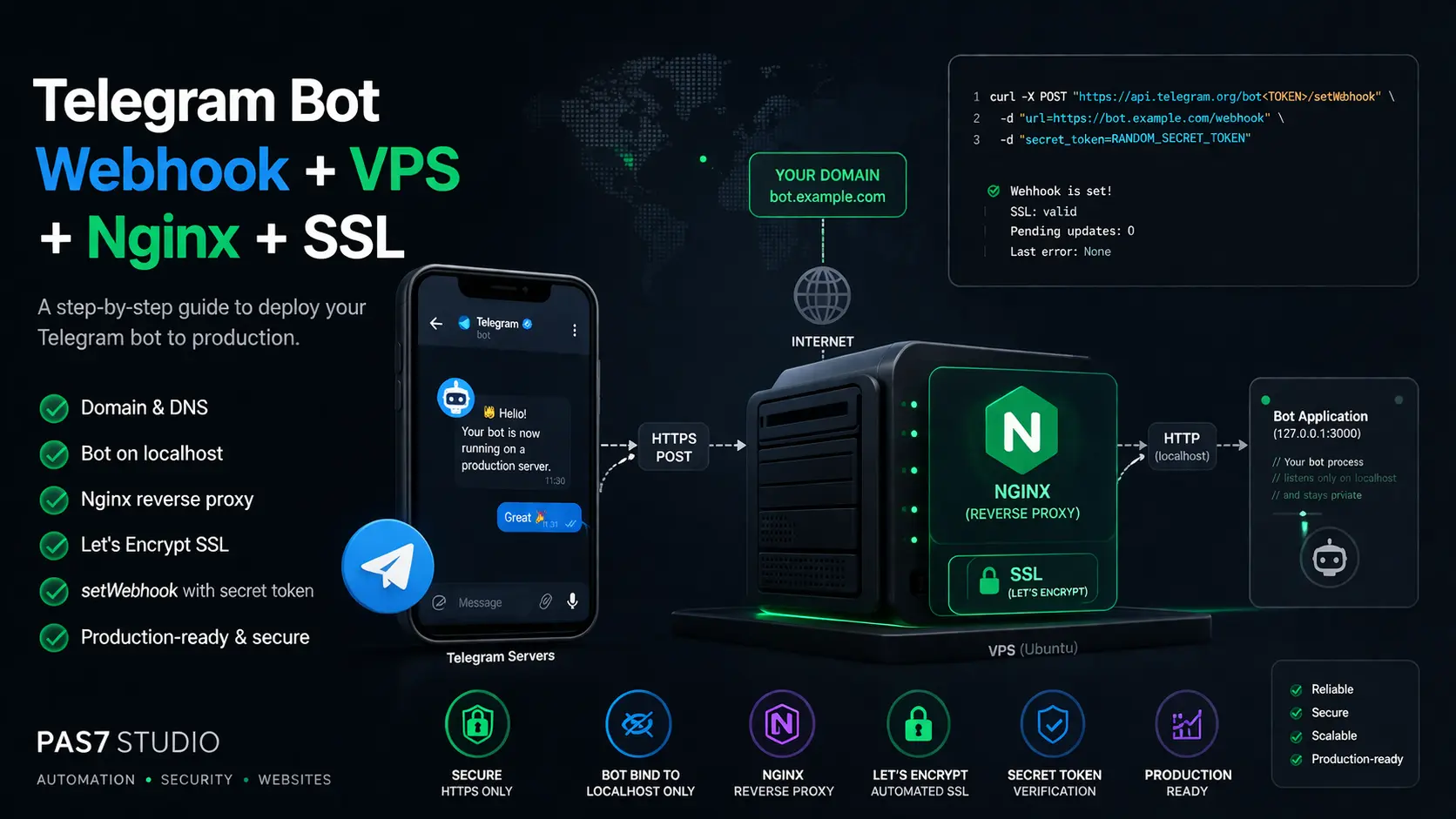
Summary
This setup exposes one public HTTPS route for Telegram and keeps the bot process private on the server.
127.0.0.1:3000.setWebhook.getWebhookInfo.Start with the server state that certificate issuance and reverse proxying require.
Point the domain to the VPS public IP
Create an A record for the hostname you will use for the webhook, for example bot.example.com.
Run the bot on localhost
Bind the bot application to 127.0.0.1:<port>. Do not expose the bot app directly on a public interface.
Keep the public edge simple
Route public traffic only through Nginx. Let the bot app handle updates, not TLS, redirects, or public routing.
Required starting state
DNS must resolve to the VPS, the bot must listen locally, and ports 80 and 443 must be reachable.
Issue the certificate before you switch the webhook to the final HTTPS route.
Install Certbot
Use the official Nginx integration so certificate issuance and renewal follow the documented flow [7].
Issue the certificate for the webhook hostname
Request the certificate for the exact hostname you will register in Telegram.
Use DNS-01 only when HTTP-01 is not possible
Switch to DNS-01 when port 80 cannot be used or when you need a wildcard certificate [9].
Result
The VPS now has a valid certificate for the webhook domain and is ready for the final HTTPS Nginx config.
Use one HTTP server block for the redirect and one HTTPS server block for the final reverse proxy. Proxy only the webhook path to the bot application on localhost [4][5][6].
Use a configuration like this:
server {
    listen 80;
    listen [::]:80;
    server_name bot.example.com;

    location / {
        return 301 https://$host$request_uri;
    }
}

server {
    listen 443 ssl http2;
    listen [::]:443 ssl http2;
    server_name bot.example.com;

    ssl_certificate /etc/letsencrypt/live/bot.example.com/fullchain.pem;
    ssl_certificate_key /etc/letsencrypt/live/bot.example.com/privkey.pem;
    ssl_session_cache shared:SSL:10m;
    ssl_session_timeout 10m;

    client_max_body_size 20m;

    location = /healthz {
        add_header Content-Type text/plain;
        return 200 "ok\n";
    }

    location /telegram/webhook {
        proxy_pass http://127.0.0.1:3000/telegram/webhook;
        proxy_http_version 1.1;
        proxy_connect_timeout 5s;
        proxy_read_timeout 60s;
        proxy_send_timeout 60s;

        proxy_set_header Host $host;
        proxy_set_header X-Real-IP $remote_addr;
        proxy_set_header X-Forwarded-For $proxy_add_x_forwarded_for;
        proxy_set_header X-Forwarded-Proto $scheme;
    }

    location / {
        return 404;
    }
}
Reload Nginx after you save the configuration. The bot stays private on 127.0.0.1, and Telegram reaches only the HTTPS route exposed by Nginx.
What this config does
HTTP redirects to HTTPS, HTTPS terminates TLS, and only the webhook path reaches the bot process.
Register the final public HTTPS URL only after Nginx and SSL are already working. Set a secret_token and verify it in the application with the X-Telegram-Bot-Api-Secret-Token header [1].
Register the webhook:
curl -X POST "https://api.telegram.org/bot$BOT_TOKEN/setWebhook" -d "url=https://bot.example.com/telegram/webhook" -d "secret_token=replace_with_a_long_random_value" -d 'allowed_updates=["message","callback_query"]'Check the status:
curl "https://api.telegram.org/bot$BOT_TOKEN/getWebhookInfo"Use allowed_updates to limit delivery to the update types your bot actually handles. Read pending_update_count and the last error message in getWebhookInfo when delivery fails [1].
Webhook registration rule
Register the webhook only after the HTTPS endpoint is already reachable and valid.
Run these checks after the webhook is registered.
The domain resolves to the VPS public IP
Verify the exact hostname used in setWebhook.
The bot listens on localhost only
Keep the bot on 127.0.0.1:<port>.
Ports 80 and 443 are open
Check both host firewall rules and provider-side network rules [10].
Nginx proxies only the webhook path
Avoid broad public proxy rules for the whole application.
The app verifies the secret token header
Reject requests that do not match the configured token [1].
Telegram reports a healthy webhook state
Check getWebhookInfo after the first live requests [1].
Deployment target
A healthy deployment has a valid certificate, one public HTTPS route, and a bot process that stays private.
Most webhook failures come from a small set of repeatable mistakes.
Running the bot on 0.0.0.0 and exposing it directly to the internet.
Registering the webhook before the HTTPS endpoint is reachable.
Accepting any POST request on the webhook route without verifying the secret token [1].
Handling slow synchronous work inside the webhook request instead of acknowledging quickly.
Forgetting that getUpdates does not work while a webhook is active [1].
The pattern
Breakages usually come from wrong exposure, wrong order, or missing request validation.
You need a public HTTPS endpoint that Telegram can reach. A VPS is the most common way to control the domain, Nginx, certificate issuance, and firewall rules in one place.
No. When a webhook is active, Telegram disables `getUpdates` for that bot.
Telegram documents support for ports 443, 80, 88, and 8443. In most production setups, use 443 as the public HTTPS entry point.
This keeps the application off the public network surface. Nginx handles public HTTPS traffic, and the bot receives only proxied internal requests.
Check the public HTTPS route, then run `getWebhookInfo` and read the last error message and `pending_update_count`.
These sources support the Telegram webhook behavior, Nginx proxy setup, SSL flow, and firewall guidance used in this tutorial.
PAS7 Studio helps teams deploy Telegram bots with stable webhook routing, reverse proxy setup, certificate automation, app process management, migration from polling, and production hardening around the full stack.
Related Articles
AI SEO / GEO in 2026: Your Next Customers Aren’t Humans — They’re Agents
Search is shifting from clicks to answers. Bots and AI agents crawl, cite, recommend, and increasingly buy. Learn what AI SEO / GEO means, why classic SEO is no longer enough, and how PAS7 Studio helps brands win visibility in the agentic web.
The most powerful Apple chip yet? M5 Pro and M5 Max are breaking records
A data-backed March 2026 analysis of Apple M5 Pro and M5 Max. We break down why these chips can credibly be called Apple's most powerful pro laptop silicon, how they compare with M4 Pro, M4 Max, M1 Pro, M1 Max, and how they stack up against Intel and AMD laptop rivals.
Artemis II and the Code That Carries Humans to the Moon
This article unpacks NASA's Artemis II mission, launched on April 1, 2026, and explains what it really says about modern engineering: flight software, backup logic, simulation, telemetry, human control, and the careful role AI can play in space systems.
Automatic Tagging & Search for Saved Links
Integrate with GDrive/S3/Notion for automatic tagging and fast search via search APIs
Professional development for your business
We create modern web solutions and bots for businesses. Learn how we can help you achieve your goals.