How Much Does an Ecommerce Website Cost in 2026? Platforms, Timelines, and Buyer Trade-Offs
A buyer-friendly 2026 guide to ecommerce website costs, platform options, realistic timelines, maintenance, and when a template setup is enough versus when custom development makes sense.
In 2026, the price of an ecommerce website is not just the platform subscription. Most buyers also need to budget for payment processing, apps or plugins, setup work, product data preparation, localization, and ongoing support, then choose a platform that fits both launch speed and long-term operations.
What business owners should know before they budget
Most ecommerce projects go over expectation for one simple reason: buyers compare plan prices first and business reality second.
What an ecommerce website in 2026 actually involves
For most buyers, an online store is not just a website with product pages. It is a system that has to handle product data, variants, stock status, shipping rules, taxes, checkout, transactional emails, analytics, search visibility, and post-launch changes. Once you add international sales, marketplaces, CRM, accounting, warehouse, or ERP connections, it becomes a business operations project, not only a design project.
This is why the cheapest plan on a pricing page rarely tells the full story. A store can launch on a modest monthly subscription, but still require meaningful work around theme setup, payment gateways, shipping logic, localized content, app selection, SEO structure, and QA. On platforms like Webflow and Squarespace, buyers also need to understand where platform transaction fees sit on top of processor fees or where plan tiers change store economics [9][12].
The most useful way to think about the decision is this: what are you buying for the next 12 to 24 months? A fast launch, deeper ownership, stronger design freedom, easier international selling, or a system that can absorb operational complexity. The right answer changes with your catalog, team, margins, and growth plan.
Bottom line
In 2026, ecommerce website planning is about total cost of ownership, not only subscription price. Platform fit, operational complexity, and maintenance model usually matter more than the cheapest advertised plan.
Compare platform models before you compare plan prices
Before looking at individual vendors, it helps to separate the main platform models buyers actually choose between.
| Comparison point | SaaS builders | Commerce-focused SaaS | Open-source / self-hosted | Enterprise / advanced |
|---|---|---|---|---|
| Good fit for | Small catalogs, faster launch, low technical overhead | Growing product businesses that need stronger commerce features | Brands that want control, ownership, and flexible site architecture | Complex catalogs, B2B, multi-store, deep integrations |
| Typical examples | Wix, Squarespace, Webflow Ecommerce | Shopify, BigCommerce, Ecwid | WooCommerce, PrestaShop Classic, Shopware Community Edition, Magento Open Source | Adobe Commerce, higher-tier Shopware setups, large Magento partner builds |
| What the base subscription usually covers | Hosting, platform updates, core website tools | Hosting, commerce engine, core updates, vendor support model | Usually only the software license, not the operating burden | Depends on edition and contract, but implementation cost is the real budget driver |
| Main trade-off | Easy to run, but less flexible at the edges | Faster path to scale, but meaningful SaaS lock-in | More control, but more maintenance and technical responsibility | Highest cost and highest specialist dependency |
| International selling | Possible, but feature depth varies by platform and tier | Usually more mature for regions, currencies, and localized selling | Very flexible, but usually requires more setup decisions | Strong potential for multi-brand and multi-region operations |
| Best buyer mindset | Keep it simple and launch cleanly | Grow on a mature hosted commerce stack | Own the stack and accept ongoing responsibility | Treat ecommerce as a mission-critical business system |
Hosted platforms buyers shortlist most often
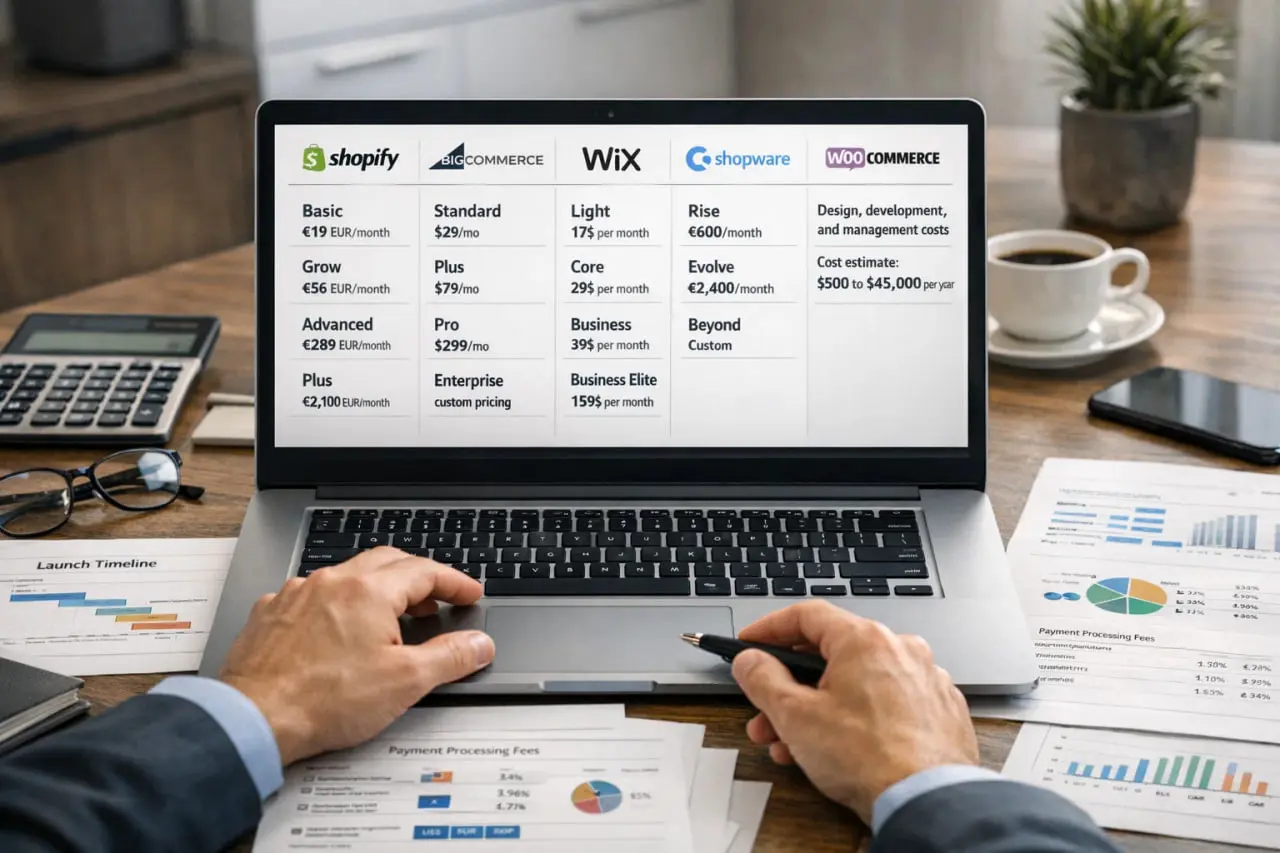
These are the hosted options most business owners compare first. Published prices can vary by country, billing cycle, and storefront location, so always confirm your local version of the official pricing page before you budget [1][6][13][14].
Shopify
A strong default for many small and mid-sized product brands. It is easy to operate, has a large app ecosystem, and supports multilingual storefronts with separate URLs for translated content. Pricing is localized by store location, and third-party transaction fees can apply depending on the payment setup, so total cost often rises through apps, payment choices, and ongoing optimization rather than server work [1][2][3].
BigCommerce
A good fit for growing brands that want a hosted platform with more operational depth. Official pricing starts at Standard $39, Plus $105, and Pro $399, and BigCommerce clearly positions itself around no additional transaction fees at the platform level. It is often attractive to buyers who expect growth and want stronger commerce capabilities without immediately moving into enterprise territory [10][11].
Wix
Best for smaller businesses that want an all-in-one website builder with ecommerce built in. Wix states that it does not charge additional transaction fees for third-party gateways, while payment provider fees still apply. It is easy to run day to day, but deeper customization and more complex operations can become limiting over time [6][7][8].
Squarespace
A strong choice for design-led brands with focused catalogs. Its published USD pricing sheet makes one buyer issue very clear: plan fees and store transaction fees are not the same thing. The sheet shows a 2% online store transaction fee on Basic and 0% on Core, Plus, and Advanced, with separate card processing rates and different digital product or membership fee rules by tier [9].
Ecwid
Useful when you already have a website and want to add a store quickly, or when you want a straightforward hosted commerce layer. Ecwid's March 2026 pricing update lists Venture, Business, and Unlimited tiers, and the pricing page states 0 fees charged per sale by Ecwid. It also supports multilingual selling on qualifying plans, which matters for smaller cross-border stores [13][14][15].
Webflow Ecommerce
Attractive to design-led brands that want more visual control than a typical builder. Buyers should read its pricing carefully: Webflow explicitly lists a 2% platform transaction fee on the Standard ecommerce plan and 0% on Plus and Advanced, in addition to Stripe or PayPal processing fees. Localization is also a paid add-on, starting from $9 per month and scaling by locales [12].
What this means for buyers
Hosted platforms reduce technical risk and usually launch faster, but their economics differ. The real decision is not just monthly price. It is how much commerce depth, design freedom, localization, and future flexibility you need.
Open-source and advanced platforms for control-heavy stores
These options make more sense when ownership, site architecture, or operational complexity matters more than convenience.
This is the part many buyers misunderstand. A free platform license does not mean a cheap ecommerce project. It usually means the software itself is free, while hosting, security, plugin or module decisions, development work, and support become your responsibility or your partner's responsibility [4][5][19][20][23].
WooCommerce
A strong option when your store is part of a larger WordPress content strategy. The core plugin is free, but official cost guidance points buyers toward recurring costs such as hosting, domain, SSL, and payment processing. WooCommerce can scale well with the right architecture, but it behaves more like an owned website project than a plug-and-play commerce subscription [4][5].
PrestaShop
A practical open-source option for cost-sensitive SMBs, especially in Europe. PrestaShop offers Classic as a free download and Hosted from €24 per month excluding VAT. The platform gives flexibility, but the official ecosystem also openly frames store cost around support model, modules, and who maintains the implementation over time [19][20][21].
Shopware
A credible option for businesses that want room to grow from open-source to supported tiers. Shopware lists Community Edition as free, Rise from €600 per month, Evolve from €2,400 per month, and Beyond as custom pricing. Its documentation also makes multilingual and multi-currency management easier to evaluate for international selling [16][17][18].
Adobe Commerce / Magento
Usually the right discussion only when ecommerce is a core system, not a side channel. Adobe Commerce is quote-based, while Magento Open Source is presented as a free ecommerce platform. The trade-off is clear: the ceiling is high for multi-store, B2B, and integration-heavy needs, but so are implementation cost, maintenance burden, and specialist dependency [22][23][24].
What this means for buyers
Open-source and advanced platforms are valuable when you need control or complexity handling, but they reward strong ownership. If your team does not want to run an ongoing website system, the theoretical savings often disappear later.
The development stages that actually consume time and budget
Most ecommerce buyers think the project is mainly about design and coding. In practice, time goes into decisions, data, operations, and testing.
Discovery and scope control
Define business goals, catalog size, product structure, shipping model, returns, analytics, and launch boundaries. This stage is where you prevent expensive scope drift later.
Platform selection
Choose the platform that matches operations, not just aesthetics. This is where buyers decide how much lock-in, flexibility, and maintenance responsibility they are willing to accept.
UX and theme or design direction
Pick a proven template or create tailored layouts for homepage, collection pages, product pages, cart, and any conversion-critical landing pages.
Catalog and content setup
Load product data, categories, variants, pricing, imagery, policies, FAQs, and editorial content. This is one of the most common schedule bottlenecks on real projects.
Payments, shipping, and tax configuration
Set up gateways, understand processor costs versus platform-level fees, configure shipping methods, tax logic, and region-specific rules.
SEO and tracking foundation
Implement redirects, metadata, indexing rules, analytics, structured navigation, and localized SEO where needed. This matters early because fixing bad foundations after launch is slow and expensive.
Integrations and automation
Connect email or SMS, inventory, accounting, ERP, support tools, marketplace feeds, or fulfillment systems. This is where many simple stores turn into systems projects.
QA, launch, and support
Test checkout, tax and shipping edge cases, mobile behavior, performance, transactional emails, and rollback plans, then prepare for support, fixes, and ongoing optimization after launch.
Where buyers often lose time
Delayed approvals, incomplete product data, unclear shipping or tax rules, and late integration requests often add more time than theme setup itself.
Realistic ecommerce website timelines
Use ranges, not promises. Ecommerce timelines expand or shrink mainly because of scope, content readiness, and integration depth.
A template-based launch can move quickly when products, pricing, images, shipping rules, and approvals are already organized. Once the project needs tailored design, custom workflows, or third-party system integration, delivery usually moves into multi-week or multi-month territory [25][29][30].
For complex agency-led ecommerce projects, long timelines are normal. Clutch reports a typical ecommerce development project timeline of around 9 months based on collected client reviews, which is useful as a buyer expectation anchor for larger initiatives rather than simple template launches [26].
1-3 weeks
Small catalog, minimal integrations, ready product data, and limited design changes.
4-10 weeks
Tailored theme work, moderate catalog, essential integrations, QA, and launch preparation.
3-9+ months
Complex operations, multiple regions, ERP or warehouse integration, or multi-store requirements.
~9 months
Useful for agency-led ecommerce initiatives with broader scope, not for simple hosted-store setups.
A simple rule
If a store is easy to describe, it can often launch fast. If it touches multiple systems, regions, or internal workflows, expect the timeline to behave like a business systems project.
What the real budget is made of
The platform fee is the baseline, not the total. Buyers should separate recurring platform cost from build cost and from post-launch operating cost.
Published plan prices are real and important, but they only answer one line in the budget. The final number depends on how much setup, customization, localization, and ongoing support your business needs [1][5][9][10][12][13][16][19][22].
1. Platform subscription or license
This is the monthly or annual fee shown on the pricing page. For example, BigCommerce publishes Standard at $39, Plus at $105, and Pro at $399, while Squarespace shows Basic at $16, Core at $23, Plus at $39, and Advanced at $99 on its published USD sheet [9][10]. On open-source platforms, this line can be low or even free, but that does not remove the rest of the budget [4][19][23].
2. Payment processing and transaction fees
This is where many buyers under-budget. Payment processor fees are separate from platform fees, and some platforms also apply plan-based store transaction fees or extra fees depending on payment method. Squarespace and Webflow are especially clear examples of how these layers can stack [9][12]. Shopify also documents third-party transaction fees in specific cases [2].
3. Apps, plugins, modules, and add-ons
The more your store depends on add-ons for reviews, subscriptions, translations, filtering, feeds, reporting, or automation, the less meaningful the base plan price becomes. On Webflow, localization is a paid add-on. On WooCommerce, PrestaShop, and similar stacks, plugin or module choices strongly affect total ownership cost [5][12][20].
4. Setup and build cost
A small DIY template launch can stay in the low thousands or below if you do most of the work yourself. Freelancer or partner-led work is usually priced as hourly, fixed scope, or phased delivery. Agency-led ecommerce builds commonly move into five figures once design, integrations, QA, and launch support are included [25][26][27][29].
5. Ongoing maintenance and support
Support is not only for broken things. It covers updates, performance, improvements, testing, security, analytics changes, and business requests after launch. Common market patterns range from hourly support to monthly retainers from hundreds to thousands of dollars depending on what is included [26][28].
6. Internal time and readiness cost
Even when an external team builds the store, your business still pays in approvals, product data cleanup, photography, policy writing, shipping decisions, and launch coordination. This is usually the hidden cost that delays projects.
The buyer takeaway
A low-cost entry plan can still lead to a high-cost project if your store needs many apps, careful data setup, international selling, or regular ongoing support.
When a template setup is enough and when custom development pays off
A template-based setup is often enough when you are launching a relatively standard store: small or moderate catalog, standard checkout, straightforward shipping rules, no unusual customer flows, and no deep integrations. In this case, the smartest move is usually to choose a stable hosted platform, keep scope tight, and invest more in clean product data, branding, and conversion essentials than in custom features.
Custom development starts to make sense when the store has operational complexity that templates do not handle cleanly. Common examples are custom product logic, unusual pricing rules, subscription or membership workflows, ERP or warehouse connections, multi-region architecture, B2B quoting, or a storefront that is tightly linked to a content or lead-generation system.
There is also a middle ground that many buyers miss: guided customization inside a strong platform. This often means starting with Shopify, BigCommerce, WooCommerce, Shopware, or PrestaShop and then adding carefully scoped design, integrations, and automation without turning the project into a fully bespoke build. For many SMBs, that is the best balance between speed, ownership, and future growth.
A practical rule for 2026
Use a template when your business model is standard. Pay for custom work when your operations, catalog logic, or growth model would be awkward or fragile inside a standard setup.
Common buyer mistakes that make cheap projects expensive
Most bad ecommerce projects do not fail because of the platform alone. They fail because the buyer decision was made on the wrong criteria.
Choosing only by monthly plan price and ignoring processor fees, apps, localization, and support.
Over-customizing too early instead of validating the standard store model first.
Starting migration or redesign work before product data, categories, variants, and policy content are ready.
Treating integrations as minor add-ons when they often change timeline, testing scope, and long-term maintenance.
Not planning post-launch ownership, which leads to a store that is live but difficult to improve.
What this means
The cheapest first decision often creates the most expensive second decision. Good ecommerce planning reduces rework, migration pain, and avoidable long-term support cost.
How to choose the right platform before you hire a team
Use this checklist before you ask for quotes. It gives you cleaner proposals and makes platform advice more trustworthy.
Define what you are selling
How many products, how many variants, how often the catalog changes, and whether you need subscriptions, bundles, memberships, or B2B logic.
Map your operations
List shipping regions, tax needs, returns process, stock handling, fulfillment tools, accounting, and any internal systems the store must connect to.
Decide how much control you really want
If your team does not want to manage maintenance, avoid pretending that open source is automatically cheaper.
Clarify international selling requirements
Do you need multiple currencies, multiple languages, localized SEO, or separate regional storefronts from day one?
Set a launch scope and a phase-two list
Separate the must-have launch features from the features that can wait. This protects budget and speeds up delivery.
Budget for support before launch
Plan who will maintain apps, monitor the store, fix issues, improve pages, and handle future requests.
Ask every vendor the same buyer questions
What is included, what is recurring, what depends on third parties, what could force replatforming later, and what happens after launch.
Why this helps
A clear pre-quote checklist makes it much easier to compare Shopify, WooCommerce, Wix, BigCommerce, Webflow, Magento, and other options on business fit instead of sales language.
FAQ
The cheapest path is usually a template-based launch on a hosted platform, with a small catalog and minimal custom work. That keeps setup simple, but it only stays cheap if your products, shipping logic, and business model are also simple.
Not always. Shopify usually has a clearer recurring subscription model and lower technical overhead, while WooCommerce can start with a free core plugin but shifts more cost into hosting, plugins, maintenance, and support. The better question is which model fits your business and team better [1][2][4][5].
A realistic monthly budget usually includes the platform plan, payment processing, apps or add-ons, and some level of support or maintenance. For simple stores this can stay modest, while larger or actively managed stores often need a recurring support budget in the hundreds or thousands per month depending on scope [26][28].
A straightforward template launch can happen in 1 to 3 weeks if your content is ready. A customized store often lands in the 4 to 10 week range, while integration-heavy ecommerce implementations commonly take several months [25][26][29][30].
Custom work makes sense when your store has non-standard product logic, unusual checkout or pricing rules, serious integration requirements, multi-region complexity, or when ecommerce is central enough to justify a more tailored system.
Only if international selling is part of your near-term plan. If it is, check exactly how the platform handles languages, currencies, localized SEO, and regional storefronts before you commit, because these features vary a lot by platform and plan [3][8][11][12][15][17][18][21][24].
Sources
Official pricing pages and documentation were prioritized for platform facts. Market-range sources are included only for budgeting and timeline context.
Plan the right platform, build, or migration
If you are comparing platform options, planning a new online store, or trying to understand whether a template setup is enough, PAS7 Studio can help you turn the decision into a realistic delivery plan. We support ecommerce website planning, platform selection, custom implementation, migration, and ongoing support. That includes buyer-side scope definition, technical trade-off review, launch planning, and post-launch improvement work so the store is not just live, but maintainable.
Related Articles

How to Add Mau Saver to a Telegram Group and Save Media in Chat
A practical guide to adding Mau Saver to a Telegram group and downloading videos, audio, and posts directly in the chat.

How to Advertise to an International Telegram Media Audience
A practical guide for advertisers: reach an international Telegram audience through Mau Saver Bot, group placements, pinned posts, and native media integrations.

AI Assistant Development Cost in 2026: RAG Chatbots, CRM Integrations, Guardrails, and Support
A practical buyer guide to AI assistant development cost in 2026: prototypes, RAG chatbots, knowledge-base assistants, CRM and website integrations, guardrails, evaluations, monitoring, and support.

AI Can Make More. Not Better: What Game Development Research Actually Says
Generative AI is entering game production, but the evidence is more nuanced than the hype. We examine developer adoption, player reception, quality risks, and a practical production model for using AI without outsourcing taste.