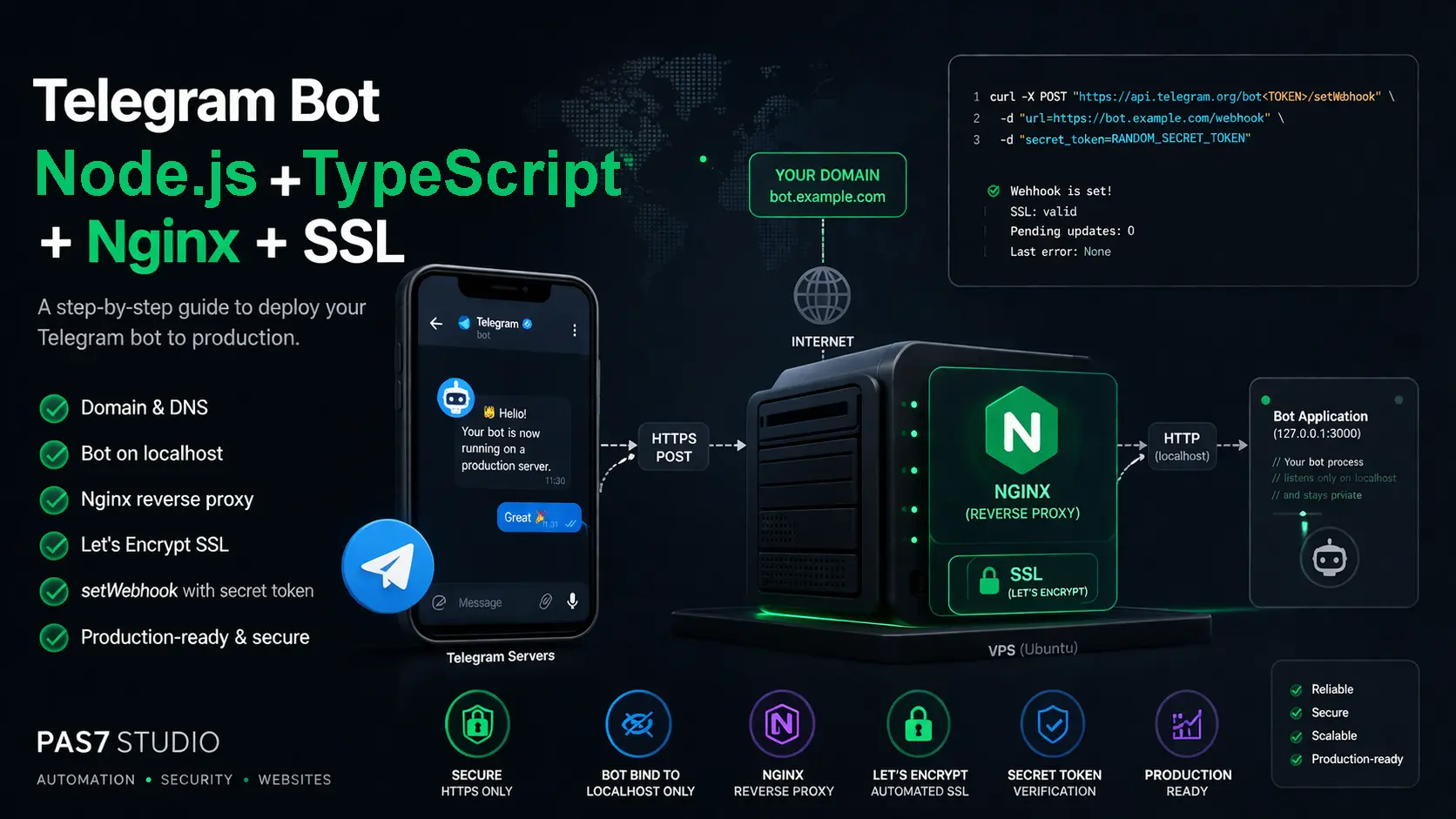
Deploy a Telegram Bot Webhook with Node.js, TypeScript, grammY, Nginx, SSL, and systemd
A practical 2026-ready tutorial for deploying a Telegram bot webhook on a VPS with Node.js, TypeScript, grammY, Nginx, Let's Encrypt SSL, and systemd. Includes working code, webhook registration, and production checks.
Run the bot as a local Node.js process, handle updates with grammY, keep the app behind Nginx, issue SSL with Let's Encrypt, and let systemd manage the process on Linux.
What you are building
This tutorial is for one clear result: a Telegram bot running on a VPS with a real webhook, HTTPS, and a process that starts automatically after server reboots.
127.0.0.11. Create the project
Start with a clean directory on the VPS. The app uses TypeScript, grammY, Express as a thin HTTP adapter for webhook handling, and no separate process manager beyond systemd.
Create the project and install dependencies:
mkdir -p ~/apps/telegram-bot-webhook
cd ~/apps/telegram-bot-webhook

npm init -y
npm pkg set scripts.build="tsc -p tsconfig.json"
npm pkg set scripts.start="node dist/server.js"

npm install grammy express dotenv
npm install -D typescript @types/node @types/express
Create the folder structure:
mkdir -p src
touch tsconfig.json
touch .env.example
touch src/bot.ts
touch src/server.ts
Use this tsconfig.json:
{
  "compilerOptions": {
    "target": "ES2022",
    "module": "CommonJS",
    "moduleResolution": "Node",
    "rootDir": "src",
    "outDir": "dist",
    "strict": true,
    "esModuleInterop": true,
    "forceConsistentCasingInFileNames": true,
    "skipLibCheck": true
  },
  "include": ["src/**/*.ts"]
}
Use this .env.example:
HOST=127.0.0.1
PORT=3000
BOT_TOKEN=replace_with_your_bot_token
WEBHOOK_SECRET=replace_with_a_long_random_secret
WEBHOOK_PATH=/telegram/webhook
Why this setup
It keeps the deployment path readable. The code stays small, the runtime dependencies stay obvious, and the server setup stays close to the way Linux servers are already designed to run services.
2. Add the working bot code
The bot logic and the HTTP entry point are split into two files. That keeps the webhook transport separate from the Telegram command logic.
Use this src/bot.ts:
import { Bot } from "grammy";

const botToken = process.env.BOT_TOKEN;

if (!botToken) {
  throw new Error("BOT_TOKEN is required");
}

export const bot = new Bot(botToken);

bot.command("start", async (ctx) => {
  await ctx.reply("Webhook is live. Your TypeScript bot is running.");
});

bot.command("ping", async (ctx) => {
  await ctx.reply("pong");
});

bot.on("message:text", async (ctx) => {
  if (ctx.message.text.startsWith("/")) {
    return;
  }

  await ctx.reply("You said: " + ctx.message.text);
});
Use this src/server.ts:
import "dotenv/config";
import express, { type NextFunction, type Request, type Response } from "express";
import { webhookCallback } from "grammy";
import { bot } from "./bot";

const host = process.env.HOST || "127.0.0.1";
const port = Number(process.env.PORT || 3000);
const webhookPath = process.env.WEBHOOK_PATH || "/telegram/webhook";
const webhookSecret = process.env.WEBHOOK_SECRET;

if (!webhookSecret) {
  throw new Error("WEBHOOK_SECRET is required");
}

const app = express();

app.disable("x-powered-by");
app.use(express.json({ limit: "1mb" }));

app.get("/healthz", (_req: Request, res: Response) => {
  res.status(200).json({ ok: true });
});

function verifyTelegramSecret(req: Request, res: Response, next: NextFunction): void {
  const secret = req.header("x-telegram-bot-api-secret-token");

  if (secret !== webhookSecret) {
    res.status(403).json({ ok: false });
    return;
  }

  next();
}

app.post(
  webhookPath,
  verifyTelegramSecret,
  webhookCallback(bot, "express")
);

app.use((_req: Request, res: Response) => {
  res.status(404).json({ ok: false });
});

async function start(): Promise<void> {
  await bot.init();

  app.listen(port, host, () => {
    console.log("Telegram webhook app listening on http://" + host + ":" + port + webhookPath);
  });
}

start().catch((error) => {
  console.error("Failed to start bot:", error);
  process.exit(1);
});
The code does four important things: it keeps the app on localhost, exposes a health endpoint, verifies Telegram’s secret header before the middleware runs, and handles real bot commands with grammY instead of manually parsing updates.
What is already production-friendly here
The bot process is private, the webhook route is explicit, and Telegram requests are rejected if the secret token does not match.
3. Build and test the app on the server
Before touching Nginx or certificates, make sure the app itself works locally on the VPS.
Create the real environment file
Copy .env.example to .env and fill in the bot token and a long random webhook secret.
Build the project
Run npm run build so the TypeScript output lands in dist/.
Start the built app once
Run npm start and confirm the process starts without configuration errors.
Check the local health endpoint
Run curl http://127.0.0.1:3000/healthz and confirm the JSON response is { "ok": true }.
Why this order matters
If the local app is broken, adding Nginx and SSL only makes the failure harder to debug.
4. Create the systemd service
Use the Linux service manager that is already part of the server instead of adding PM2 as another moving piece. The service file below is enough for one bot process.
Create a file named telegram-bot-webhook.service:
[Unit]
Description=Telegram Bot Webhook
After=network.target
Wants=network.target

[Service]
Type=simple
User=ubuntu
WorkingDirectory=/home/ubuntu/apps/telegram-bot-webhook
Environment=NODE_ENV=production
EnvironmentFile=/home/ubuntu/apps/telegram-bot-webhook/.env
ExecStart=/usr/bin/node /home/ubuntu/apps/telegram-bot-webhook/dist/server.js
Restart=always
RestartSec=5
NoNewPrivileges=true
PrivateTmp=true

[Install]
WantedBy=multi-user.target
Install and start it:
sudo cp telegram-bot-webhook.service /etc/systemd/system/telegram-bot-webhook.service
sudo systemctl daemon-reload
sudo systemctl enable --now telegram-bot-webhook
sudo systemctl status telegram-bot-webhook
Read the logs:
journalctl -u telegram-bot-webhook -fChange the User, WorkingDirectory, EnvironmentFile, and ExecStart values to match your server. Do not copy the /home/ubuntu/... paths blindly.
Deployment target at this point
The bot now runs as a normal Linux service and will come back after a reboot without any extra Node-specific process manager.
5. Add the initial Nginx config
Start with the HTTP config first. Certbot can then use the existing Nginx site and add HTTPS for you.
Create an Nginx site such as /etc/nginx/sites-available/bot.example.com:
server {
    listen 80;
    listen [::]:80;
    server_name bot.example.com;

    location = /healthz {
        proxy_pass http://127.0.0.1:3000/healthz;
        proxy_http_version 1.1;
        proxy_set_header Host $host;
        proxy_set_header X-Forwarded-Proto $scheme;
    }

    location = /telegram/webhook {
        proxy_pass http://127.0.0.1:3000/telegram/webhook;
        proxy_http_version 1.1;
        proxy_connect_timeout 5s;
        proxy_read_timeout 60s;
        proxy_send_timeout 60s;
        proxy_set_header Host $host;
        proxy_set_header X-Real-IP $remote_addr;
        proxy_set_header X-Forwarded-For $proxy_add_x_forwarded_for;
        proxy_set_header X-Forwarded-Proto $scheme;
    }

    location / {
        return 404;
    }
}
Enable the site and reload Nginx:
sudo ln -s /etc/nginx/sites-available/bot.example.com /etc/nginx/sites-enabled/bot.example.com
sudo nginx -t
sudo systemctl reload nginx
The route in Nginx must match the route in .env and the route you will later register with Telegram. If one of these paths differs, webhook delivery will fail.
Keep the public edge boring
Only Nginx should be reachable from the public internet. The Node.js app stays on 127.0.0.1.
6. Issue the SSL certificate with Certbot
At this point DNS should already point bot.example.com to the VPS public IP, and port 80 should be reachable from the internet.
Install Certbot and prepare the command:
sudo snap install --classic certbot
sudo ln -s /snap/bin/certbot /usr/local/bin/certbot
Issue the certificate through the Nginx flow:
sudo certbot --nginx -d bot.example.comTest automatic renewal:
sudo certbot renew --dry-runCheck the public health endpoint:
curl https://bot.example.com/healthzDo not register the Telegram webhook before this works over HTTPS.
What Certbot gives you here
A valid certificate, an HTTPS-enabled Nginx site, and a cleaner deployment path than manually assembling TLS files in the first pass.
7. Register the webhook in Telegram
Now point Telegram at the final public URL. The secret in setWebhook must match the secret stored in .env.
Register the webhook:
export BOT_TOKEN=replace_with_your_bot_token

curl -X POST "https://api.telegram.org/bot$BOT_TOKEN/setWebhook" \
  -d "url=https://bot.example.com/telegram/webhook" \
  -d "secret_token=replace_with_a_long_random_secret" \
  -d 'allowed_updates=["message"]'
Check the webhook state:
curl "https://api.telegram.org/bot$BOT_TOKEN/getWebhookInfo"When this is correct, the url field should show your HTTPS endpoint, and last_error_message should be empty or absent.
The two values that must line up
The webhook URL path and the webhook secret must match across the app, Nginx, and Telegram.
8. Verify the full deployment
Run these checks in order so you can identify exactly where a failure starts.
The service is active in systemd
Check systemctl status telegram-bot-webhook before blaming Nginx or Telegram.
The local health endpoint works
Check curl http://127.0.0.1:3000/healthz on the server itself.
The public HTTPS health endpoint works
Check curl https://bot.example.com/healthz from outside the app process.
The webhook info is clean
Use getWebhookInfo and look for a matching URL and no recent delivery error.
Telegram commands actually trigger replies
Send /start and /ping to the bot after the webhook is active.
Logs stay readable during a real request
Watch journalctl -u telegram-bot-webhook -f while sending a message to the bot.
What success looks like
A message sent in Telegram reaches the bot through HTTPS, the app replies, and the Linux service stays stable without manual babysitting.
9. Fix the mistakes that break this setup
Most deployment failures come from a small set of mismatches.
Running the bot only with npm start in an SSH session instead of creating a real Linux service.
Binding the app to a public interface instead of 127.0.0.1.
Using one webhook path in .env, a different path in Nginx, and a third path in setWebhook.
Using one secret in .env and another secret when calling setWebhook.
Skipping the local health check and trying to debug the whole stack at once.
Registering the webhook before HTTPS is live.
Editing Nginx config and reloading it without running nginx -t first.
Trying to use getUpdates while the outgoing webhook is active.
The pattern behind almost every bug here
Wrong order, wrong path, or wrong secret usually explains the problem.
FAQ
Because the server already has a native Linux service manager. For one VPS bot process, systemd is enough to start the app automatically, restart it on failure, and keep it alive after reboots.
Because grammY handles the Telegram update model cleanly and gives you proper command and middleware abstractions, so the tutorial stays practical without dropping into raw Bot API plumbing everywhere.
Yes, for this deployment style. Nginx is the public HTTPS edge, and the app stays private on localhost. That keeps TLS termination and public routing out of the bot process.
No. Once an outgoing webhook is active, Telegram does not let the bot receive updates through `getUpdates`.
Yes, but TypeScript is the more stable default for a new Node.js bot in 2026 if you expect the project to grow beyond a small demo.
Sources
These sources support the deployment choices, webhook behavior, and Linux service flow used in this tutorial.
Need this turned into a real production bot?
PAS7 Studio helps teams move beyond a minimal tutorial bot: production routing, Telegram integrations, admin panels, observability, background jobs, message flows, and server hardening around the full stack.
Related Articles

How to Add Mau Saver to a Telegram Group and Save Media in Chat
A practical guide to adding Mau Saver to a Telegram group and downloading videos, audio, and posts directly in the chat.

How to Advertise to an International Telegram Media Audience
A practical guide for advertisers: reach an international Telegram audience through Mau Saver Bot, group placements, pinned posts, and native media integrations.

AI Assistant Development Cost in 2026: RAG Chatbots, CRM Integrations, Guardrails, and Support
A practical buyer guide to AI assistant development cost in 2026: prototypes, RAG chatbots, knowledge-base assistants, CRM and website integrations, guardrails, evaluations, monitoring, and support.

AI Can Make More. Not Better: What Game Development Research Actually Says
Generative AI is entering game production, but the evidence is more nuanced than the hype. We examine developer adoption, player reception, quality risks, and a practical production model for using AI without outsourcing taste.